Exploring the realm of best practices for implementing RMM solutions unveils a world of possibilities for enhancing IT management. From understanding the core features to mastering customization techniques, this topic delves into the intricacies of optimizing RMM solutions with precision and foresight.
Overview of RMM Solutions
RMM (Remote Monitoring and Management) solutions play a crucial role in the efficient management of IT infrastructure by allowing businesses to remotely monitor and manage their network endpoints, servers, and other devices. These solutions help IT teams proactively identify and address issues before they escalate, leading to improved system performance, reduced downtime, and enhanced security.
Importance of RMM Solutions
RMM solutions are particularly beneficial for industries such as healthcare, finance, and retail, where data security and system uptime are critical. By implementing RMM solutions, organizations can ensure that their IT systems are always up to date, secure, and running smoothly, ultimately leading to increased productivity and cost savings.
Core Features of RMM Solutions
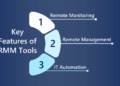
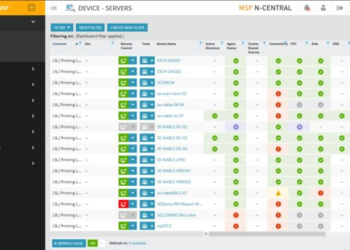
- Remote Monitoring: Allows IT teams to monitor the health and performance of network devices and endpoints from a centralized dashboard.
- Automated Patch Management: Ensures that software patches and updates are applied promptly to protect systems from vulnerabilities.
- Real-time Alerts: Notifies IT staff of any issues or anomalies in the network, enabling quick response and resolution.
- Asset Management: Provides a comprehensive inventory of hardware and software assets, facilitating better resource allocation and planning.
- Remote Control: Enables technicians to troubleshoot and resolve issues on endpoints remotely, saving time and resources.
Factors to Consider Before Implementing RMM Solutions

When implementing RMM solutions, there are several key factors to consider to ensure the success and effectiveness of the system. It is crucial to carefully evaluate these aspects before choosing an RMM solution provider, considering scalability, and examining integration capabilities.
Choosing an RMM Solution Provider
- Research the reputation and experience of the RMM solution provider in the industry.
- Consider the range of features and functionalities offered by the provider to meet your specific needs.
- Evaluate the level of customer support and training provided by the provider for smooth implementation and ongoing assistance.
- Assess the pricing structure and scalability options to ensure it aligns with your budget and future growth plans.
Scalability of RMM Solutions
- Ensure that the RMM solution can accommodate your current network size and device requirements.
- Consider future expansion plans and assess whether the RMM solution can scale up to meet the increasing demands of your organization.
- Look for flexibility in licensing options and pricing models to adjust to your changing business needs.
- Evaluate the ease of adding new endpoints and devices to the RMM system without causing disruptions.
Integration Capabilities with Existing IT Infrastructure
- Check compatibility with your current IT systems, software, and applications to ensure seamless integration.
- Assess the ease of deployment and configuration of the RMM solution within your existing infrastructure.
- Look for APIs and automation capabilities that allow for integration with other tools and systems for improved efficiency.
- Consider the ability to monitor and manage a diverse range of devices and platforms within your IT environment.
Best Practices for Implementing RMM Solutions
Implementing RMM solutions can be a game-changer for IT management, but it requires careful planning and execution to ensure success. Here are some best practices to consider:
Planning and Preparation
Before diving into implementing RMM solutions, it is crucial to have a solid plan in place. This includes defining clear objectives, assessing current IT infrastructure, and identifying key stakeholders. Establishing a timeline and budget will also help keep the implementation on track.
Customization and Configuration
One size does not fit all when it comes to RMM solutions. It is essential to customize and configure the tools to meet the specific needs of your organization. This may involve creating custom monitoring templates, setting up automated workflows, and integrating with existing systems.
Training IT Staff
Proper training is key to the successful adoption of RMM solutions. Make sure to provide comprehensive training sessions for IT staff to ensure they understand how to use the tools effectively. This includes educating them on best practices, troubleshooting techniques, and how to interpret the data provided by the RMM solutions.
Monitoring and Managing RMM Solutions
Monitoring and managing RMM solutions is crucial for ensuring the optimal performance and security of your IT infrastructure. Continuous monitoring allows you to proactively identify and address any issues before they escalate, while proper maintenance ensures that your RMM solutions are up-to-date and effective.
Analyzing Data Collected by RMM Solutions
Analyzing the data collected by RMM solutions is essential for maximizing efficiency. By examining key metrics and trends, you can gain valuable insights into the health and performance of your systems. This data can help you make informed decisions, optimize resource allocation, and identify areas for improvement.
- Regularly review performance reports generated by RMM solutions to identify patterns or anomalies.
- Utilize data visualization tools to create easy-to-understand graphs and charts for better analysis.
- Compare current data with historical data to track progress and identify trends over time.
- Collaborate with IT teams to interpret data and develop strategies for enhancing system performance.
Troubleshooting and Resolving Issues with RMM Solutions
Troubleshooting and resolving issues with RMM solutions is a critical aspect of effective IT management. By following best practices, you can quickly address any problems that arise and minimize downtime for your organization.
- Document common issues and their resolutions to create a knowledge base for troubleshooting.
- Regularly update RMM software to access the latest features and security patches.
- Implement automated alerts and notifications to promptly respond to critical issues.
- Conduct regular training sessions for IT staff to ensure they are equipped to troubleshoot RMM solutions effectively.
Outcome Summary
In conclusion, the journey through implementing RMM solutions is marked by strategic planning, continuous monitoring, and a commitment to efficiency. By following the best practices Artikeld here, businesses can navigate the complexities of IT management with confidence and success.
Questions Often Asked
What are the key considerations when choosing an RMM solution provider?
Key considerations include compatibility with existing systems, scalability, pricing, and customer support quality.
How can RMM solutions be tailored to specific needs through customization and configuration?
By adjusting alert thresholds, setting up automated workflows, and defining monitoring policies, RMM solutions can be customized to align with unique requirements.
What are the best practices for training IT staff on using RMM solutions effectively?
Training programs should focus on hands-on experience, real-world scenarios, and regular updates to keep staff well-versed in utilizing RMM solutions.